
PARAMETRIC · 3D · STEP / STL / 3MF
WormWORM
Enter module, number of starts, diameter quotient and length to preview a worm (ZA / Archimedean thread) live and download STEP, STL or 3MF. Left or right hand, shaft ends and bore.
- ProfileZA straight axial
- Starts1–4
- HandRight / Left
- OutputSTEP · STL · 3MF · DXF
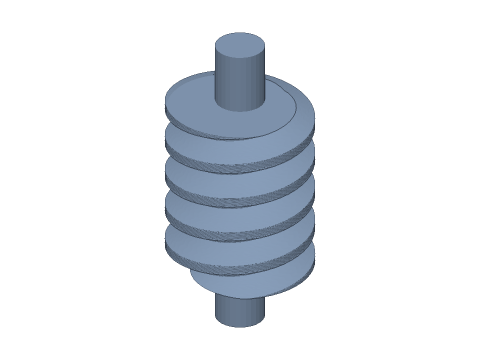
LIVE · WORM
m=2 · z1=1 · RH
SCALE 1:1 · mm
Drag to rotate · scroll to zoom · right-drag to pan
CALCULATED · SPEC
AUTO-COMPUTED
d1
20.00mm
Pitch diameter
da1
24.00mm
Tip diameter
df1
15.00mm
Root diameter
px
6.283mm
Axial pitch
pz
6.283mm
Lead
γ
5.71°
Lead angle
L
50.0mm
Overall length
HOW-TO
How to generate a worm STEP / STL file
- 1Enter axial module, starts and diameter quotient q — the thread updates live.
- 2Set thread length, hand, and shaft ends or a bore.
- 3Create the mating wheel in the worm-wheel generator with the same module, worm pitch diameter and starts.
- 4Check the spec cards and any warnings.
- 5Download STEP, STL or 3MF — or send it to Orinovate for a quote.
What is a worm?
A worm is a screw-shaped gear that meshes with a worm wheel on a crossed (90°) axis. A single stage gives a large reduction, runs quietly and can self-lock — ideal for lifts, valve actuators, rotary tables and 3D-printer mechanisms. This tool models a ZA (Archimedean) worm: straight-sided trapezoidal axial profile, 20° pressure angle, addendum 1 m and dedendum 1.25 m.
Key formulas
Pitch diameter d1 = q·m; tip diameter da1 = d1 + 2m; root diameter df1 = d1 − 2.5m; axial pitch px = π·m; lead pz = z1·px; lead angle γ = atan(pz / (π·d1)) = atan(z1 / q). The worm's axial module equals the wheel's transverse module, and both must have the same hand.
Specs at default parameters
| Parameter | Value | Range |
|---|---|---|
| Axial module (m) | 2 mm | 0.5–6 |
| Starts (z1) | 1 | 1–4 |
| Diameter quotient (q) | 10 | 6–20 |
| Thread length (b1) | 30 mm | 2–150 |
| Hand | Right hand | Right hand / Left hand |
| Shaft diameter | 8 mm | 0–60 |
| Shaft length | 10 mm | 0–200 |
| Bore | 0 mm | 0–60 |
| Backlash | 0 mm | 0–0.5 |
| Bore clearance | 0 mm | 0–1 |
| Pitch diameter (d1) | 20.00 mm | — |
| Tip diameter (da1) | 24.00 mm | — |
| Root diameter (df1) | 15.00 mm | — |
| Axial pitch (px) | 6.283 mm | — |
| Lead (pz) | 6.283 mm | — |
| Lead angle (γ) | 5.71 ° | — |
| Overall length (L) | 50.0 mm | — |
FAQ
How is the worm drive ratio calculated?
Ratio i = wheel teeth z2 ÷ worm starts z1. A single-start worm with a 30-tooth wheel gives 30:1; a two-start worm gives 15:1. One stage reaches 10–100:1.
Is a worm drive self-locking?
When the lead angle γ = atan(z1·m / d1) is below roughly 5° (single start, q = 10–16), friction exceeds the lead angle and the wheel cannot back-drive the worm. Lubrication and vibration affect this, so never rely on it alone for safety-critical holding.
Which diameter quotient q should I use?
q = d1 / m; common values are 8, 10, 12.5 and 16. Small q → bigger lead angle and efficiency but a slender worm; large q → stiffer and more self-locking. For 3D printing use q = 8–10 with m ≥ 1.
What is the centre distance?
a = (d1 + d2) / 2 = (q·m + z2·m) / 2. For m2, q10 and a 30-tooth wheel: a = (20 + 60) / 2 = 40 mm.
Which software opens the worm STEP file?
STEP (AP214) opens in Fusion 360, SolidWorks, FreeCAD, Onshape and Rhino. STL / 3MF import directly into Bambu Studio, PrusaSlicer or Cura.
Is it free?
Yes — no sign-up, no fees. Need a physical part? Send it to Orinovate for an instant quote in FDM, SLA, SLS, MJF or CNC.
Related generators
Related calculators
Related articles
Need a physical part?
Send the model straight to Orinovate's instant quote: FDM, SLA, SLS, MJF, metal printing and CNC, made in Hsinchu, Taiwan.
About STEP / STL / 3MF / DXF
- STEP (.step / .stp, AP214) keeps exact dimensions and surfaces for editing in Fusion 360, SolidWorks or FreeCAD.
- STL and 3MF are triangle meshes that import directly into Bambu Studio, PrusaSlicer or Cura.
- DXF is the top-view 2D outline, ready for laser cutting, waterjet or CNC routing.
- All models are in millimetres at true scale.