
PARAMETRIC · 3D · STEP / STL / 3MF
BoxBOX
Generate a 3D-printable box with wall, floor, corner radius, inner fillet and slip-on lid. STEP, STL, 3MF.
- OptionsCorner R · inner fillet
- LidSlip-on, laid beside
- OutputSTEP · STL · 3MF · DXF
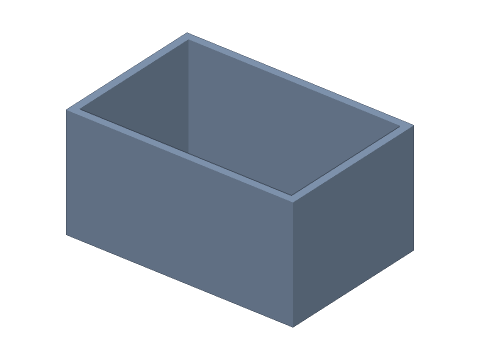
LIVE · BOX
60 × 40 × 30 · t2
SCALE 1:1 · mm
Drag to rotate · scroll to zoom · right-drag to pan
CALCULATED · SPEC
AUTO-COMPUTED
wi × di × hi
56 × 36 × 28mm
Inner size
Vi
56.4mL
Capacity
V
15552mm³
Material volume
HOW-TO
How to generate a box STEP / STL file
- 1Enter outer width, depth and height.
- 2Set the wall thickness and, if needed, a custom bottom.
- 3Add a corner radius, inner fillet or slip-on lid.
- 4Check the spec cards and any warnings.
- 5Download STEP, STL or 3MF — or send it to Orinovate for a quote.
A parametric storage box
An open-top rectangular box with configurable outer size, wall and floor thickness, plus optional outer corner radius, inner fillet and slip-on lid. Great for printed organisers, electronics enclosures, drawer inserts or gift boxes. With a lid, box and lid are exported side by side in one file.
Formulas
Inner size wi = W − 2t, di = D − 2t, hi = H − b; capacity Vi ≈ (wi·di − (4 − π)rv²)·hi (rv = inner vertical radius, floor fillet ignored); material V = (W·D − (4 − π)R²)·H − Vi. 1 mL = 1,000 mm³.
Specs at default parameters
| Parameter | Value | Range |
|---|---|---|
| Outer width (W) | 60 mm | 5–1000 |
| Outer depth (D) | 40 mm | 5–1000 |
| Height (H) | 30 mm | 2–1000 |
| Wall thickness (t) | 2 mm | 0.4–50 |
| Bottom thickness | Same as wall | Same as wall / Custom |
| Bottom thickness (b) | 2 mm | 0.4–100 |
| Outer corner radius (R) | 0 mm | 0–200 |
| Inner fillet (r) | 0 mm | 0–50 |
| Lid | None | None / Slip-on lid (laid beside) |
| Lid skirt height (h) | 8 mm | 2–200 |
| Lid clearance (c) | 0.2 mm | 0–2 |
| Inner size (wi × di × hi) | 56 × 36 × 28 mm | — |
| Capacity (Vi) | 56.4 mL | — |
| Material volume (V) | 15552 mm³ | — |
FAQ
What wall thickness should I use?
With a 0.4 mm nozzle choose 1.2 (3 lines), 1.6 (4) or 2.0 mm (5) so the slicer fills the wall with whole perimeters — strongest and fastest. Keep the floor ≥ 1.2 mm (4–6 layers).
How much lid clearance?
The lid's inside is c larger per side than the box's outside. On FDM 0.2 mm is a snug fit and 0.3–0.4 mm looser; resin can go down to 0.1 mm. The lid is output top-down beside the box so both print together.
Why add an inner fillet?
Rounded inside corners avoid stress concentrations, make the box stronger and are easier to clean and to scoop small parts out of.
Which software opens the box STEP file?
STEP (AP214) opens in Fusion 360, SolidWorks, FreeCAD, Onshape and Rhino. STL / 3MF import directly into Bambu Studio, PrusaSlicer or Cura.
Is it free?
Yes — no sign-up, no fees. Need a physical part? Send it to Orinovate for an instant quote in FDM, SLA, SLS, MJF or CNC.
Related generators
Related articles
Need a physical part?
Send the model straight to Orinovate's instant quote: FDM, SLA, SLS, MJF, metal printing and CNC, made in Hsinchu, Taiwan.
About STEP / STL / 3MF / DXF
- STEP (.step / .stp, AP214) keeps exact dimensions and surfaces for editing in Fusion 360, SolidWorks or FreeCAD.
- STL and 3MF are triangle meshes that import directly into Bambu Studio, PrusaSlicer or Cura.
- DXF is the top-view 2D outline, ready for laser cutting, waterjet or CNC routing.
- All models are in millimetres at true scale.