
PARAMETRIC · 3D · STEP / STL / 3MF
Parts TrayPARTS TRAY
Set outer size, rows, columns, wall thickness and pocket fillet to generate a compartment parts tray (screw organizer) and download STEP, STL or 3MF for 3D printing.
- GridRows × columns
- PocketsFilleted scoop
- OutputSTEP · STL · 3MF · DXF
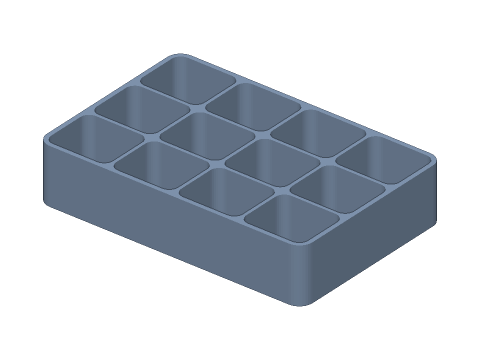
LIVE · PARTS TRAY
120×80×25 · 4×3
SCALE 1:1 · mm
Drag to rotate · scroll to zoom · right-drag to pan
CALCULATED · SPEC
AUTO-COMPUTED
a×b
27.9 × 24.3mm
Pocket size
h
23.5mm
Pocket depth
n
12
Pockets
V
15.9cm³
Volume per pocket
HOW-TO
How to generate a parts tray STEP / STL file
- 1Enter outer width, depth and height.
- 2Set rows and columns, then wall, divider and fillet.
- 3Check the spec cards and any warnings.
- 4Download STEP, STL or 3MF — or send it to Orinovate for a quote.
Designing a parts tray
Compartment trays sort screws, nuts, electronics and small hardware. Pocket width = (W − 2t − (n − 1)·td) / n; every pocket gets filleted vertical corners and a filleted floor for easy picking.
Printing tips
Print flat side down — no supports. For trays taller than 50 mm use thicker walls or 3–4 perimeters. PLA is fine for storage; PETG resists impact in a toolbox.
Specs at default parameters
| Parameter | Value | Range |
|---|---|---|
| Outer width (W) | 120 mm | 10–500 |
| Outer depth (D) | 80 mm | 10–500 |
| Height (H) | 25 mm | 3–200 |
| Columns (X) | 4 | 1–20 |
| Rows (Y) | 3 | 1–20 |
| Outer wall (t) | 2 mm | 0.4–20 |
| Divider (td) | 1.5 mm | 0.4–20 |
| Pocket fillet (R) | 4 mm | 0–50 |
| Floor (tb) | 1.5 mm | 0.4–50 |
| Pocket size (a×b) | 27.9 × 24.3 mm | — |
| Pocket depth (h) | 23.5 mm | — |
| Pockets (n) | 12 | — |
| Volume per pocket (V) | 15.9 cm³ | — |
FAQ
How thick should printed tray walls be?
With a 0.4 mm nozzle, 1.2–2 mm outer walls and 0.8–1.5 mm dividers are plenty. Multiples of the line width avoid gaps in the slicer.
Why fillet the pockets?
Screws and washers get stuck in square corners. An R4–R8 fillet lets parts roll out with a finger and makes cleaning easy.
Can I make it Gridfinity-sized?
This tray has a flat base. Gridfinity uses a 42 mm grid (41.5 mm actual) and 7 mm height units — use the preset for the footprint and add a base if needed.
Which software opens the parts tray STEP file?
STEP (AP214) opens in Fusion 360, SolidWorks, FreeCAD, Onshape and Rhino. STL / 3MF import directly into Bambu Studio, PrusaSlicer or Cura.
Is it free?
Yes — no sign-up, no fees. Need a physical part? Send it to Orinovate for an instant quote in FDM, SLA, SLS, MJF or CNC.
Related generators
Related articles
Need a physical part?
Send the model straight to Orinovate's instant quote: FDM, SLA, SLS, MJF, metal printing and CNC, made in Hsinchu, Taiwan.
About STEP / STL / 3MF / DXF
- STEP (.step / .stp, AP214) keeps exact dimensions and surfaces for editing in Fusion 360, SolidWorks or FreeCAD.
- STL and 3MF are triangle meshes that import directly into Bambu Studio, PrusaSlicer or Cura.
- DXF is the top-view 2D outline, ready for laser cutting, waterjet or CNC routing.
- All models are in millimetres at true scale.