
PARAMETRIC · 3D · STEP / STL / 3MF
WheelWHEEL
Set wheel diameter, tire thickness, width, tire edge radius and bore type (D-cut, hex…), add lightening holes, and download a robot or model wheel as STEP, STL or 3MF.
- BoreRound / D / keyway / hex
- Holes0–12
- OutputSTEP · STL · 3MF · DXF
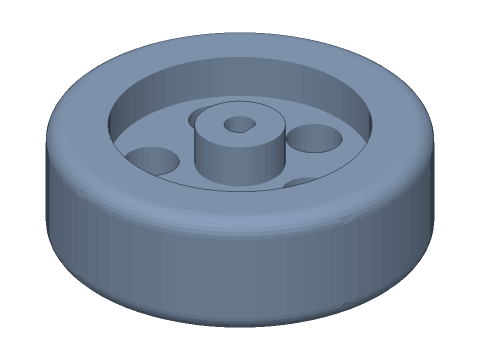
LIVE · WHEEL
⌀60 × 20
SCALE 1:1 · mm
Drag to rotate · scroll to zoom · right-drag to pan
CALCULATED · SPEC
AUTO-COMPUTED
C
188.5mm
Circumference
Dr
48.0mm
Rim diameter
dh
8.7mm
Hole diameter
s
0.188m/rev
Travel per revolution
HOW-TO
How to generate a wheel STEP / STL file
- 1Enter wheel diameter, tire thickness and width.
- 2Set bore type, hub and lightening holes.
- 3Check the spec cards and any warnings.
- 4Download STEP, STL or 3MF — or send it to Orinovate for a quote.
Wheel construction
Tire, rim, disc and hub are fused into one solid: the tire has rounded edges, the disc has adjustable thickness and lightening holes, and the full-width hub takes a round, D-cut, keyway, hex or square bore.
Design tips
Robots and small rovers typically use ⌀40–⌀100 mm wheels with width about ¼–⅓ of the diameter. Lightening holes save material and print time; keep a thicker disc for load-bearing wheels.
Specs at default parameters
| Parameter | Value | Range |
|---|---|---|
| Wheel diameter (D) | 60 mm | 5–500 |
| Tire thickness (t) | 6 mm | 0.5–100 |
| Width (W) | 20 mm | 1–200 |
| Tire edge radius (R) | 3 mm | 0–50 |
| Web thickness | 6 mm | 0.5–200 |
| Lightening holes | 5 | 0–12 |
| Bore (d) | 5 mm | 0–100 |
| Bore type | D-cut | Round / D-cut / Keyway / Hex / Square |
| Hub diameter | 14 mm | 2–300 |
| Circumference (C) | 188.5 mm | — |
| Rim diameter (Dr) | 48.0 mm | — |
| Hole diameter (dh) | 8.7 mm | — |
| Travel per revolution (s) | 0.188 m/rev | — |
FAQ
What shaft does a yellow TT gear motor have?
A double-D shaft about 5.4 mm across with ~3.7 mm between flats. The D-cut here has one flat at 0.9·d; enlarge the bore by 0.1–0.2 mm if the print is tight.
How far does the wheel travel per turn?
π × diameter. A ⌀65 mm wheel moves ~204 mm per revolution; at 200 rpm that is ≈ 0.68 m/s.
How do I add grip to a printed wheel?
Print the tire separately in TPU, or stretch an O-ring or rubber band over the rim. All-PLA wheels work but slip on smooth floors.
Which software opens the wheel STEP file?
STEP (AP214) opens in Fusion 360, SolidWorks, FreeCAD, Onshape and Rhino. STL / 3MF import directly into Bambu Studio, PrusaSlicer or Cura.
Is it free?
Yes — no sign-up, no fees. Need a physical part? Send it to Orinovate for an instant quote in FDM, SLA, SLS, MJF or CNC.
Related generators
Need a physical part?
Send the model straight to Orinovate's instant quote: FDM, SLA, SLS, MJF, metal printing and CNC, made in Hsinchu, Taiwan.
About STEP / STL / 3MF / DXF
- STEP (.step / .stp, AP214) keeps exact dimensions and surfaces for editing in Fusion 360, SolidWorks or FreeCAD.
- STL and 3MF are triangle meshes that import directly into Bambu Studio, PrusaSlicer or Cura.
- DXF is the top-view 2D outline, ready for laser cutting, waterjet or CNC routing.
- All models are in millimetres at true scale.